Building an 8-Bit Computer from Scratch
This is the first in what I expect will be a long series of posts documenting my build of Ben Eater's 8-bit breadboard computer.

If you've spent any time watching electronics content online, you've probably encountered Ben Eater. He built a fully programmable 8-bit computer from scratch on breadboards — using nothing but basic logic gate ICs, memory chips, and a handful of resistors, capacitors, and LEDs — and documented the entire thing in a series of YouTube videos. It's the kind of project that makes you think: I want to do that.
So I am! The full video series is on YouTube, and Ben's website at eater.net/8bit has schematics, a complete parts list, and additional notes for each module.
The goal is to understand how a computer works at the most fundamental level — how logic gates combine to form registers and arithmetic units, how a clock signal coordinates everything, how a handful of simple operations can add up to something that runs a program. Alongside Ben's videos, my main reference is Malvino and Brown's Digital Computer Electronics, which I've had printed from a PDF — old school, but easier to work from on a small desk.
Why a blog?
This project fits naturally into what Back to BASIC is about: rediscovering 8-bit computing from the ground up. Many of the posts here will deal with that from the software side — BASIC and assembly. Building the hardware feels like the logical complement to that. If you want to understand what a CPU is actually doing when it executes an instruction, there's something to be said for having built one yourself!
Writing about it also forces a level of clarity that just doing it doesn't. If I can't explain what I've just built, I probably don't understand it as well as I think. And hopefully some of it is useful to others going through the same process.
The baseboard
Ben Eater's layout uses 14 830-point breadboards arranged in two columns of seven, with the spare power rails running down the centre forming the shared bus. I've followed exactly the same arrangement.
Where I've done things differently is starting with everything mounted on a proper base from day one. I work from a small desk that has to serve as both workbench and office, so I needed the project to be self-contained and easy to move around. The solution was a 40×40cm panel of 12mm high-density Hidrofugo MDF with all 14 breadboards fitted to it from the outset.
Along the top edge I've mounted a row of ON-OFF-ON toggle switches — the type intended for model railway use, where the extra ON position is for reversing polarity. I only need the ON-OFF functionality, but they were ideal for the purpose: one switch per power rail, so I can isolate any individual breadboard independently. That ought to make debugging considerably less painful once things start going wrong.
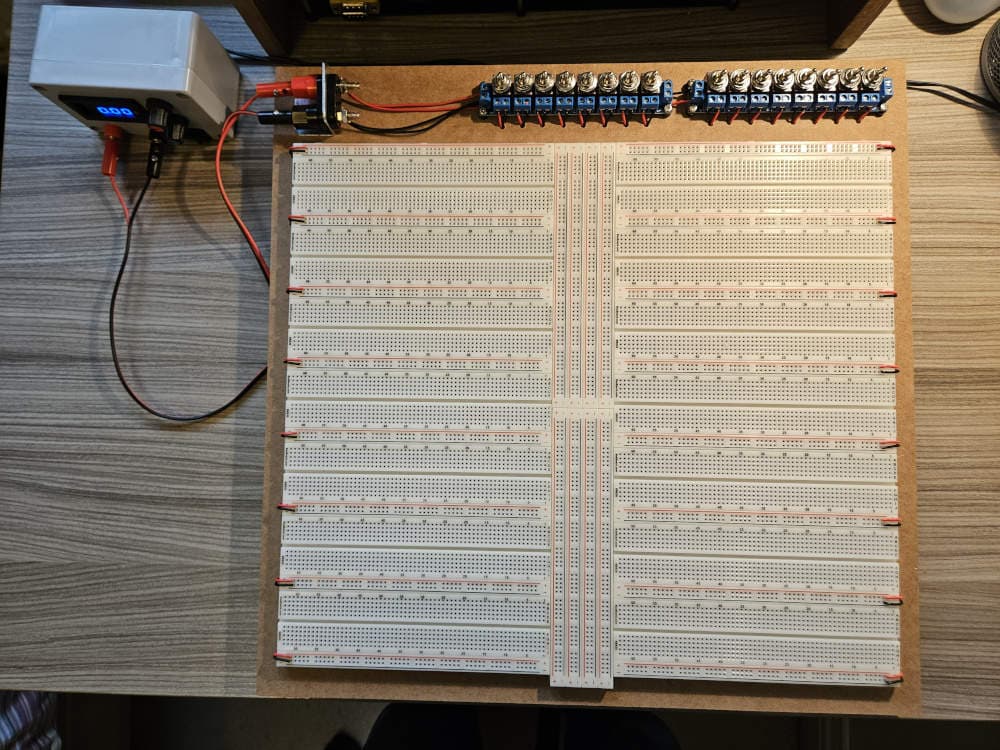
Front of the baseboard showing toggle switches and independent live and ground wires to each power rail
My workbench computer is a Raspberry Pi 5 with the official Raspberry Pi monitor — compact enough to push back when I need the desk space for the board itself or when I'm working.
Power comes from a PeakTech 6220 switched lab supply. In between that and the breadboards sits a PN Labs Protect Nano — a small board that cuts power if the voltage exceeds a set threshold. Setting it up required soldering a couple of tiny jumper pads to configure the voltage limit, which was more nerve-wracking than it sounds given I hadn't picked up a soldering iron in years. But it was worth doing: 74LS logic ICs do not appreciate much more than 5V, and the thought of frying a board full of them with a slipped dial was what prompted the precaution.
The back of the board has each breadboard's power connection run individually to the supply, with cables secured using screws and washers through the MDF. Eight rubber feet keep everything stable on the desk.
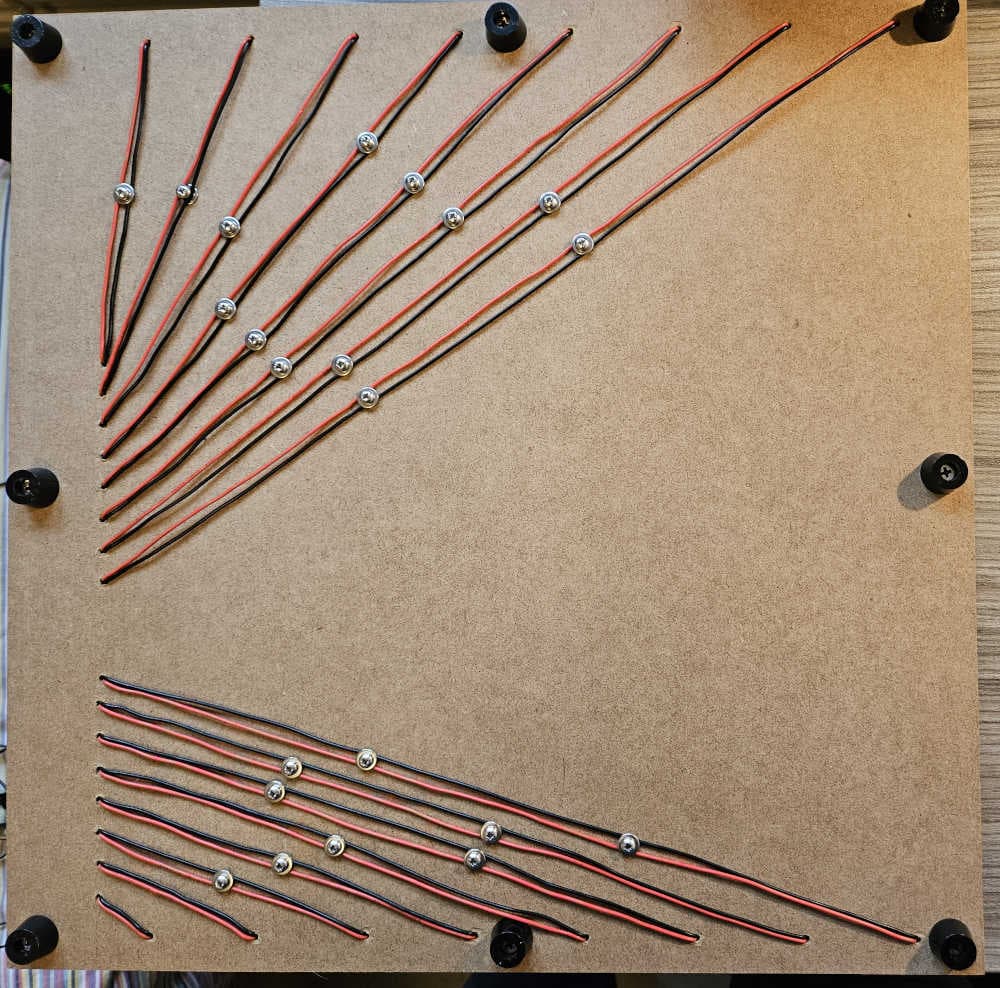
Back of the baseboard showing individually routed red and black power cables secured with screws and washers
I'm really pleased with how it turned out.
Test and measurement
To do this properly I need to be able to measure and verify rather than guess. The kit I've put together for that: a KM601S multimeter, an MK328 component tester, a BitScope micro oscilloscope with Pico TA375 probes, and an XGecu Pro T48 programmer for burning EEPROMs when the project gets that far.
What's next
With the baseboard complete, the build proper begins. The first module is the clock module: three 555 timer circuits working together to produce an adjustable clock signal that can be switched between automatic (free-running) and manual (single-step) modes. It's a self-contained starting point, and a good place to get comfortable before things get more complex.
I'll be working through Ben Eater's video series and schematics, verifying each subcircuit before integrating — and writing up what I learn along the way.
If you're following a similar build, the r/beneater subreddit is an excellent resource.